Bring your own AI agents into Word
You already built agents that draft and review in a way that works for you. Getting their work into Word is where it falls apart: you manually copy / paste into Word, and the formatting blows up. You spend 20 minutes fixing it. Then you copy / paste it back into your AI agent and start over again.
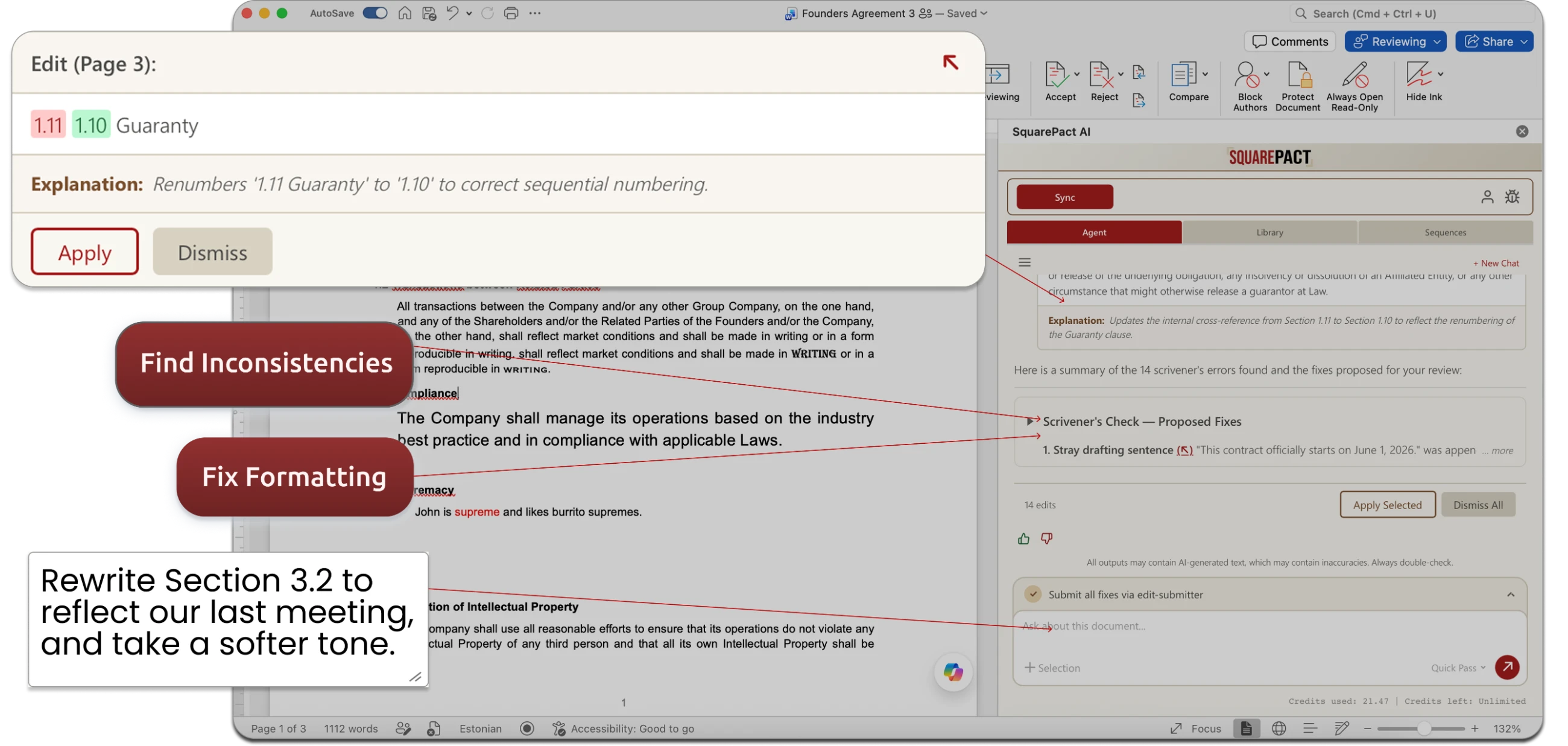
SquarePact brings your agents inside of Word, so they have direct access to formatting and edits.
We don’t want your data. We only use Zero Data Retention AI.
Read our Privacy Guarantee to learn more.
Designed to work with the AI you already use, not to replace it.
-
Most Word AI tools are a closed assistant. You get their prompt, their logic, their idea of a good redline, take it or leave it.
SquarePact is the opposite.
You can bring the agent you already built, and it runs against the open document with full structure, not a chat window guessing at content it can't see. Or, you can use the built-in SquarePact agent for capabilities you don’t want to recreate yourself. The choice is yours.
-
Totally fine as well—SquarePact gives you optional access to our own AI agent which is built specifically for editing complex documents in Word. See examples of our agent at work by scrolling down on this page.
Use our agent or bring your own: it’s entirely up to you!
-
Numbered lists reset. Styles disappear. Cross-references break. Anything that touches your document through a chat window is guessing at the content — it doesn't know the structure. SquarePact edits at the XML level, where Word actually lives. Formatting doesn't break because we never leave Word's native format.
-
And honestly, you should expect that costs will go up, especially for complex document work.
That’s why so many are turning to using their own agentic setups, or building their own routines. SquarePact is the tool built for that workflow. Although we do have our own agent you can use, we don’t force you to use it. You can use your own to save on costs, all without leaving Word.
-
We designed SquarePact for you. Use SquarePact and connect it to your own API keys and your own endpoints. You can route entirely to local or private models, so document content never leaves your infrastructure. Your data, your model, your rules.
-
It doesn’t. SquarePact augments them.
Prefer to use Claude? Then get an API key and use Claude inside of Word, with the SquarePact Word add-in.
Prefer to use some advanced agent you wrote yourself? Then get an API key and use Claude inside of Word, with the SquarePact Word add-in.
What ever you want to use as the brain, SquarePact allows you to use it. Think of SquarePact as the front-end UI for your document workflow.
-
Perfect! But if you use that AI workflow for editing Word documents, you’ve probably noticed that it doesn’t play well with preserving formatting. It doesn’t work alongside you inside of Word, while you’re working on the document.
SquarePact gives it that ability. It allows you to bring your own existing AI into Word. Or, if you prefer to use our agent inside of Word, that’s an option as well.
If you’re in an enterprise or government environment, it’s even easier. We can set up SquarePact to work entirely within your existing Azure setup (we find this works best for our government / municipality users).
You Just Changed One Word, So Why Did The Entire Page Move?
Catch The Errors That Spellcheckers Miss.
No More Re-Typing Your Own Boilerplate Every Time You Need It.
Already Part Of Your Microsoft 365 Stack.
Didn't We Already Define This Term Somewhere?
Testimonials
Who we are
Actualization AI, Inc. is a Tampa, FL-based company that spun out of the research of Professor John Licato’s Advancing Machine and Human Reasoning Lab at the University of South Florida. Dr. Licato’s AI research has been driven for 20 years by three simple ideas:
AI should help people find and fix errors.
It should not introduce more errors.
It should not try to replace people.
Document editing is one area where AI can bring the most good. We’re not talking about AI that pretends to be a lawyer. Rather, AI that fights the quirks of document editors like Word so you can spend less time wrestling with table margins and more time thinking about document strategy.
You shouldn’t need to manually copy-paste text into ChatGPT, or fight Copilot's limitations, while watching your formatting get wrecked by an edit. The problem isn't that the best AI isn’t capable. It's that none of these tools were designed around how Word documents actually work.